What is visible in the frame
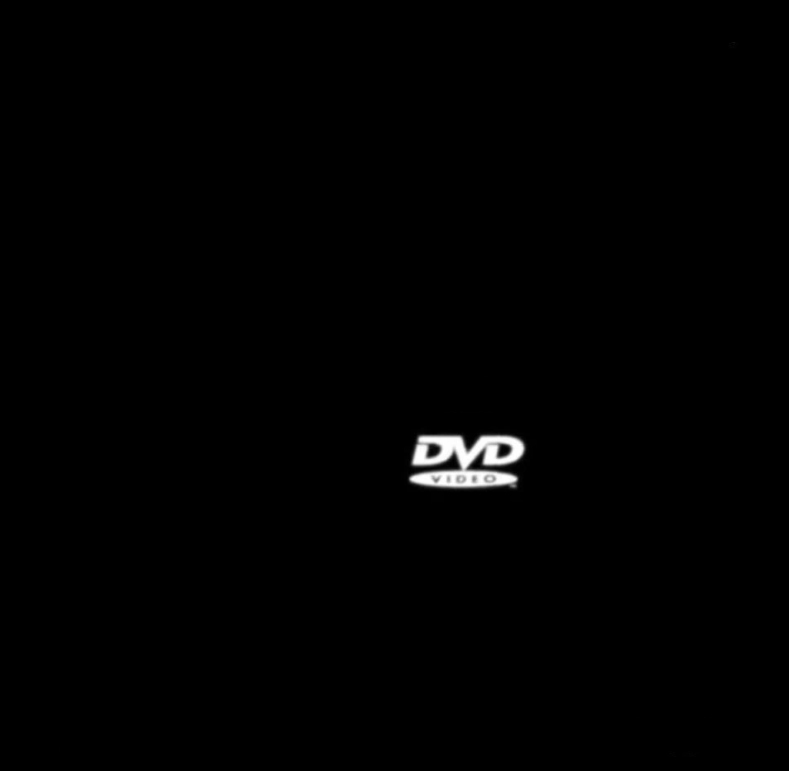
The frame is almost entirely black. In the lower part, slightly to the right of center, the white DVD Video logo is visible: the letters DVD set at an angle, with an oval containing the word VIDEO below them. Nothing else is in the frame: no borders, no captions, no marks in the corners.
Emptiness is the main device here. The viewer watches the only moving object and instinctively wonders where it will go next.
Where the screensaver came from
This screensaver appeared on DVD players when the device sat idle for a long time: the logo moved slowly across the screen and changed direction when it touched the edges. The moving image was needed so that a static label would not burn into the screen. Who exactly created the logo and the animation cannot be established for certain, so it is better not to name authors.
The joke was given a boost by a television episode: in the sitcom “The Office”, in the cold open of the episode “Launch Party”, all the employees watch the screen where the DVD logo bounces around, transfixed. Later, on a podcast with the show’s actresses, it was revealed that the logo had been added after filming. The scene clearly showed why one could watch it endlessly.
The corner as an event
What draws interest is the moment when the logo hits the corner exactly, touching two edges at once. How often this happens depends on the screen size, the size of the logo and its speed. Estimates of the waiting time vary widely, from a few minutes to tens of minutes, depending on which parameters are assumed.
Around-the-clock YouTube streams with the bouncing logo appeared. According to reports, one of them had counted 12 corner hits by 2018 across roughly 6.8 thousand bounces, so the corner is reachable but happens rarely.
The meme went into mainstream culture. In 2021, searching “DVD screensaver” on Google made a colored version of the search engine’s logo start bouncing on the screen, and in 2022 a Coinbase crypto exchange ad during the Super Bowl replaced the logo with a QR code and parodied the screensaver as a whole.
Examples of captions and their mechanics
“Waited two hours for this moment, and the logo went down.” The waiting is stretched out, while the result is fleeting. It is funny because of the gap between the long wait and the trivial ending.
“My life plan: wait for the DVD to touch the corner.” The phrase “life plan” exaggerates the scale. The joke works because waiting for a corner is almost pointless, and the deadpan delivery makes it comic.
“When they said a big event was coming soon.” The logo becomes the very “event” that is always nearby but never arrives.
“Touched two walls at once, and then I was called to dinner.” A rare event happened, but nobody saw it. The domestic twist makes the caption funny.
How to use this frame
The image suits jokes about long waiting, about nearly impossible events, and about an important moment that keeps passing by. The black background is convenient because the caption can be placed at the top or bottom without covering the logo.
In this frame there is one logo, and it is worth relying on exactly that, without inventing non-existent corners or inscriptions. Phrasings such as “waiting for everything to line up” work well, where the author admits the chance is small but the hope does not die.