What's in the picture
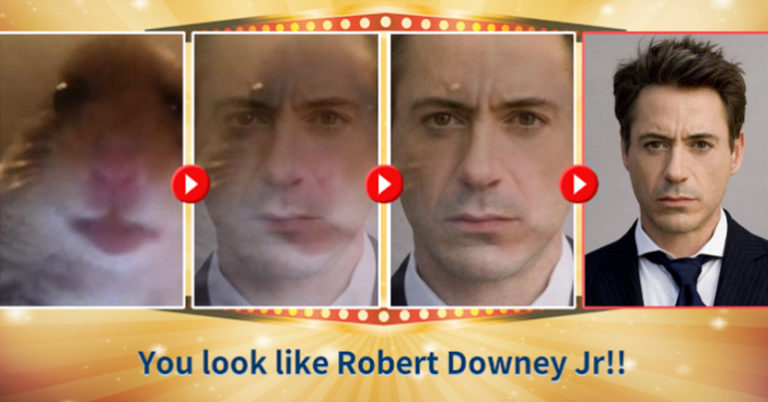
From left to right go four panels with red play buttons between them. In the first, a large photo of a hamster looking into the camera. In the next two, it gradually overlays the face of a man in a suit. The last panel shows a clear portrait of actor Robert Downey Jr., and below it, on a golden banner, is written: “You look like Robert Downey Jr!!”.
The design echoes the aesthetic of entertainment quizzes on social networks: sparkling highlights, a cinema-style frame, and a verdict caption. The joke is that the test reports the hamster's resemblance to a famous actor as if that were perfectly normal.
What Vonvon is
Vonvon is a Korean quiz and test service that became noticeable on social networks in 2017, especially through Facebook. One of its popular tests was “Which celebrity do you look like?”.
In a Korean publication of that time, the author tested the service: according to their description, the results did not depend on the face and were random, and users who logged in via Facebook handed over their profile data to the service. This is one author's opinion, not a confirmed technical audit, but it explains why jokes about “recognition errors” turned out so close to reality.
Why the joke works
The principle is simple: from an “algorithm” one expects accuracy and gets absurdity. When a hamster's photo goes in and a Hollywood actor comes out, the funny gap arises between the serious presentation and the meaningless result.
An additional layer is the ready-made format. A verdict banner is familiar to anyone who has taken social media tests, and it lets you insert any image and any “lookalike.”
Caption examples
Caption: “The result for my cat after three attempts: a different actor, but the same expression.” The joke is built on the constancy of the little face amid changing results.
Caption: “I uploaded a photo of a teapot: you look like a detective.” The absurdity is amplified by the verdict's serious tone.
Caption: “Wi-Fi password, which I've typed for the fifth time in a row: incorrect.” The format is applied to an everyday situation where a ridiculous “verdict” stings just as much as the hamster instead of the actor.
Caption: “I uploaded a photo of the hamster once more, just in case: same result — Downey Jr.” The joke repeats the test format but makes the result predictably absurd.
Why the test format proved so durable
Entertainment tests like “who do you look like” rely on a simple mechanism: a person uploads a photo or answers a couple of questions and gets a short, nicely designed verdict that they want to share. The content of the result is secondary; the main thing is the reason to show it to friends. That is exactly why such formats are easy to parody: it's enough to keep the design and replace the content with something absurd. The hamster in the first panel plays the role of “input,” and Downey Jr. at the end is the “output.” The greater the gap between them, the stronger the joke. For your own variants, it's worth keeping this three- or four-step sequence.
How to use the template
The format works best as a “verdict” after an incomprehensible input: take an absurd object and assign it a serious result. It's enough to swap the hamster and the celebrity while keeping the structure “photo — transformation — verdict.”
In captions, avoid real people who shouldn't be compared to animals without their consent: a joke about a hamster and an actor is harmless, but the same caption about an acquaintance could sound like an insult.