What the picture shows
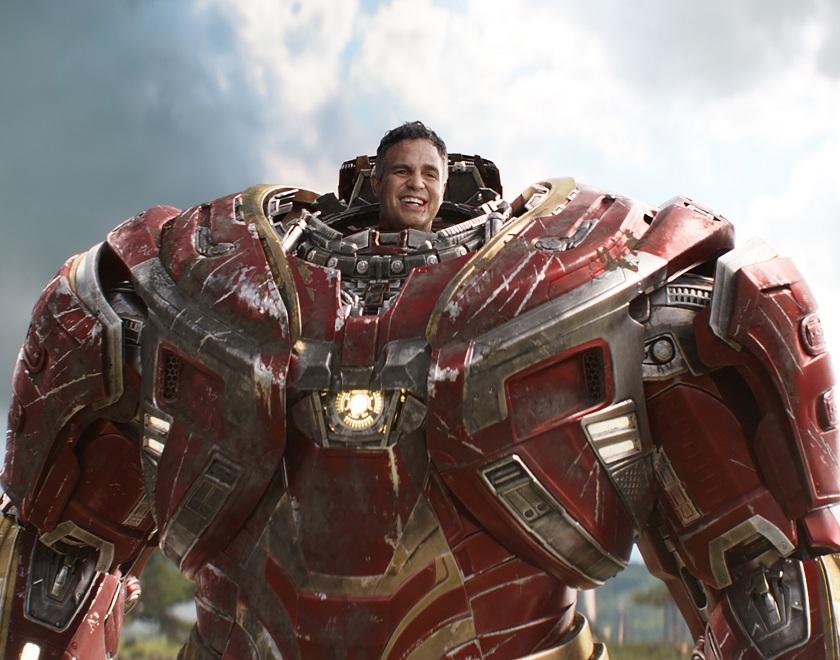
The image shows the Hulkbuster armor from the film “Avengers: Infinity War”, a red-and-gold suit with scuffs and scratches and a glowing element on the chest. From its upper part peeks a small head of a smiling man with dark hair. The background is a cloudy sky and blurred greenery.
The meme format relies on exaggerated proportions: a huge body and a tiny head. This ratio is carried over to the keyboard mistake. Who exactly is shown in the photo does not matter for the joke, so captions should be about the keyboard, not about the person in the picture.
Where the format came from
The exact origin of the meme is not established. Jokes about Caps Lock and Shift have circulated online for a long time, and the earliest version is hard to find: early examples may simply not have been saved. For that reason, no specific date or author can be named.
A general pattern explains how such pictures live: first a caption about case inversion appears, then it is moved onto different frames and characters. The template with a huge body and a tiny head proved convenient because it visually shows how a small cause produces a loud result.
The mechanics of the mistake
With Caps Lock on, letters are typed in uppercase. Shift in this mode does the opposite: it flips the case. So the first letter becomes lowercase while all the others stay uppercase. The result is “hELLO” instead of “Hello”. The mistake itself is minor, but the result looks unexpectedly loud.
The picture with a large body and a small head does the same job visually: a huge outcome grows out of a tiny cause. It is the contrast of proportions, not the keyboard itself, that makes the frame recognizable. On some keyboards and in some systems the behavior may differ, but on a typical Windows layout it happens exactly this way.
Caption examples
“hELLO, COLLEAGUES” — a greeting in a work chat that shouts louder than intended. The effect rests on the reader instantly noticing the case inversion and imagining the author’s embarrassment.
“qUARTER SALES” — a report title that looks like a loud announcement. The joke is that the small “q” is barely noticeable against the large letters, while the whole title shouts, like the huge armor in the frame.
“oPENED THE CHAT AND EVERYONE IS ALREADY DISCUSSING” — a variant where the mistake turns an ordinary message into a small episode of awkwardness, and it is no longer just a typo.
All three captions rely on one device: the first letter stands out from the rest of the text. If the caption is long, the effect weakens, so it is better to use a short phrase of two or three words.
How to adapt the template
The picture is handy for captions about technical trifles: keyboard layouts, hotkeys, autocorrect. Variants with a different character also work, but then it is important to keep the same proportion — a large image and a small cause.
To make the caption read at once, it is best to show the error on the first letter. If the text starts with a digit or a symbol, the effect disappears, because the case does not change in such cases. The reverse approach also works: a caption where everything is written correctly, and the humor lies only in the contrast between the fearsome armor and the harmless cause.