The expression and the line
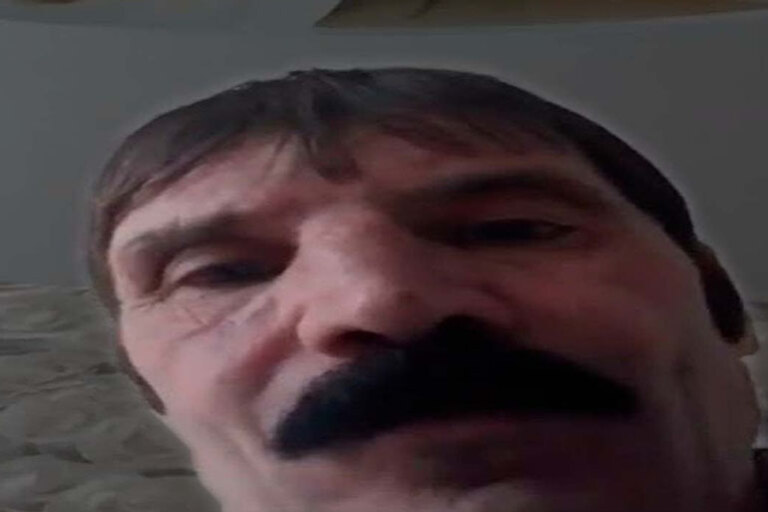
The image is a close-up of a mustached man's face, his brows knitted, his gaze fixed ahead. The emotion is a mix of irritation, alarm, and distrust of his own actions. The phrase "What did I even click?" is rendered in a deliberately ungrammatical, colloquial way — it's normally a contraction of "what did I press?" It turns the moment of an accidental click into an instant admission that the person has no idea what just happened. The identity of the man in the photo hasn't been reliably established, so the line shouldn't be attributed to him as something he actually said.
A digital mistake as a storyline
The format spread through short videos and posts about tech mishaps. In one version, a person opens a mysterious window; in another, they accidentally change settings, send a message to the wrong recipient, or delete a needed file. The joke requires two beats: first the action, then the bewilderment. The colloquial spelling stylizes the reaction as a spontaneous spoken question rather than a technical description. It's impossible to confidently name the specific first video based on one image alone.
Why the spelling is altered
The nonstandard spelling sets the character's voice and speeds up the reading. It evokes a hurried phrase blurted out right after the mistake. This isn't necessarily evidence that the real person is poorly literate; the meme's language is deliberately colloquial. It works the same way as other phonetic contractions people use for speed and tone rather than because they don't know the rules. The meme is more effective when the text is short; a grammatically polished, longer version can lose the sense of sudden bewilderment.
Examples for new situations
"I clicked 'refresh all,' and now half my tabs are gone. What did I even click?" — a version for a computer. "I agreed to auto-translate, and now I don't understand the app's menu" fits a phone. In messages, you can also use it for a trivial situation: hitting a random emoji under an important message and not knowing how to explain the choice. These examples aren't quotes from the original video. If it's about an actual loss of data, the meme doesn't substitute for practical help: it's worth checking the trash, the edit history, or a backup first.
Limits of the template
The meme suits reversible, everyday blunders where a person laughs at their own carelessness. It's less fitting when someone else made the mistake and the caption turns the reaction into an accusation, especially when there's financial damage or a leak of personal information. The photo doesn't show a screen and doesn't establish which exact button was pressed. So it's better to use the caption as a hypothetical inner monologue. That way the recognizable emotion is preserved without creating the impression that the pictured person is describing a specific incident.
There's also a second level: a person remembers pressing the button but can't connect the action to the unexpected result. Then the question sounds less like a request for help and more like a brief reaction to one's own carelessness. In a dialogue, you can reply with a second panel offering an obvious way out — "here's the change log" or "open the trash." That turn makes the meme a small story, not just a reactive face.
If the template is applied to a work system, don't add a screenshot with personal data or access tokens: the mistake itself shouldn't create a new problem. Fictional interfaces for the caption are safer than real ones.