What is drawn
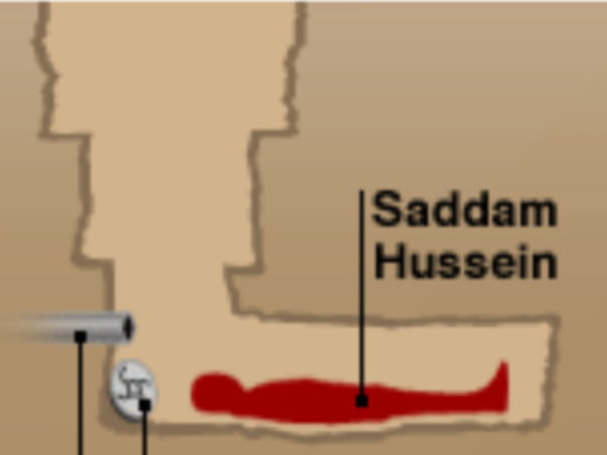
The image is a simplified infographic in sandy-beige tones. A narrow vertical shaft goes down and turns into a horizontal compartment that resembles a corridor. In the compartment lies a red silhouette of a person, with the label “Saddam Hussein” connected by a thin line. On the left, a gray pipe enters the wall, and beside it is a small round object with a conventional symbol; both are marked with dots and leader lines running past the bottom edge of the frame.
The picture is small and pixelated: wall outlines are uneven and colors are flat. It is precisely this dry, reference-style manner that makes it convenient for edits: any added text looks like one more note on a diagram.
Where the diagram comes from
The diagram illustrates the hideout where former Iraqi president Saddam Hussein was found on December 13, 2003 during an American operation. According to English reference materials, the original is an illustration published in 2003 by the British broadcaster BBC. In Russian-language descriptions the same story is called a “shelter” or a “burrow.” The exact publication and the author of the drawing are not known.
The diagram did not become a meme right away. The earliest edits turned up in 2015 on Tumblr, and the joke came back on Twitter in 2020. It became a mass template in June 2021, when one of the posts gathered more than 120 thousand likes, and users began adding game rooms, lairs and other silly additions to the underground compartment. It is this period that this meme reflects.
Why the historical diagram is funny
The main device is a clash of registers. The source is serious and documentary: it depicts a real event and a real man, drawn in a conventional way. The edit slips in small things like rent, utility bills or a gamer's “lair.” The reader takes the drawing at face value for a second, then notices the swap, and laughter is born in that gap.
The second mechanism is cramped space. A narrow crawl space itself resembles the housing in classified ads, so jokes about expensive rent and tiny apartments land on it almost effortlessly. One of the early versions is well known: “this is how much a month's rent costs in New York.”
It is important to distinguish the plot of a joke from a biography. Jokers usually poke fun not at the person but at the diagram's format, treating the picture as a set of boxes into which something can be put.
Caption examples
Made-up variants are below; they show how the template works.
“My dorm room, if you don't count my roommate.” The caption moves the diagram into an everyday context: the cramped space is described without a single word about cramping, and the viewer fills it in.
“This is what my vacation looks like: quiet, dark, and no one writes in the work chat.” Here the shelter turns into a dream of isolation. The laugh comes from a serious diagram underlining an unserious wish.
“The gray pipe on the left is pizza delivery.” A small detail added to a callout shows the most common move: a parody of technical annotations. The more businesslike the wording, the funnier it is.
“The red silhouette is me on Monday.” This variant replaces the diagram's figure with the author and plays on self-irony.
How to use the template
The best edits add one detail, not ten: the diagram reads quickly, and extra text breaks the rhythm. Keep callout labels short and dry, as if this were real infographics.
If the picture goes into a public place, remember that it is tied to a real historical event. Joke about the diagram's form and everyday trivia, and do not attribute to real people anything that is not known about them. The source quality is low, so do not enlarge it too much: pixel artifacts catch the eye quickly.